Considering AI calling software for your business? These AICallings reviews examine the advertised features, pricing, potential benefits, and important concerns before you invest. Here is what prospective buyers should know about the platform and what to check before relying on it for business calls.
AICallings Reviews: Product Summary
Product Name: AICallings
Creator: Anirudh Baavra, as identified in the supplied offer information; not independently verified
Category: AI calling software and business call automation
Advertised Price: 65–67 for the front-end options
Refund Policy: Exact refund period and conditions have not been verified. Check the current checkout terms before purchasing.
Official Website: AICallings sales page used for research; its claims and checkout details should be confirmed before publication.
Independent Rating: Not independently rated. There is insufficient verified evidence to assign a reliable score out of five.
Potential Extra Costs: AI usage, telephony, taxes, third-party services, and optional upgrades may increase the total cost.
What Is AICallings?
AICallings is presented as an AI-powered calling and business communication platform. It is designed to help users create AI callers, customize their scripts, provide information through knowledge bases, and automate parts of their phone communication workflows.
The offer describes tools for call logging, transcripts, post-call analysis, integrations, and workflow automation. It also mentions third-party connectivity, including Twilio, and calendar-related functions for checking or booking appointments.
The exact features available may depend on the package you choose. Some functions may also require external accounts, compatible services, technical configuration, or additional usage fees.
For small businesses, the main attraction is straightforward: automate selected repetitive calls instead of manually handling every conversation. However, whether AICallings delivers a useful experience depends on voice quality, setup, call limits, integration compatibility, and the needs of your business.
How Does AICallings Work?
The advertised workflow can be understood in a few steps. Actual setup screens and capabilities should be checked against the current product.
Step 1: Choose a package. Select the front-end option that matches your expected calling volume and the number of AI callers you need.
Step 2: Configure an AI caller. Set up the caller and customize its script around a specific task, such as answering common questions or following up with interested prospects.
Step 3: Add relevant information. Where supported, provide a knowledge base so the AI caller has business information to reference during conversations.
Step 4: Connect compatible services. The offer describes integrations and API or webhook functionality. Third-party accounts and technical configuration may be necessary, depending on your workflow.
Step 5: Test the calling process. Check how the caller handles questions, pauses, unexpected responses, and requests to speak with a person. Test appointment-related functions before using them with real customers.
Step 6: Review call records. Advertised logging, transcripts, and post-call analysis may help users review conversations and identify areas for improvement.
This process is not necessarily plug-and-play. The quality of your scripts, integrations, and testing can affect the final experience.
AICallings Reviews: Key Features and Potential Benefits
The following features are described in the offer. They should be treated as advertised capabilities rather than independently verified performance results.
AI callers: Create automated callers for selected business communication tasks.
Custom scripts: Define the purpose of a call and the information the caller should communicate.
Knowledge base: Provide relevant business information to support conversations, where included.
Third-party integrations: Connect compatible tools, with Twilio specifically mentioned in the supplied offer details.
API and webhooks: Potentially connect calling activity to other software or workflows.
Calendar-related functions: The offer describes appointment checking and booking capabilities, subject to package and integration requirements.
Call logs and transcripts: Review recorded call information where supported and appropriately configured.
Post-call analysis: Examine conversations to understand what happened and identify possible improvements.
Workflow automation: Reduce some repetitive manual steps in a business calling process.
The potential benefit is convenience, not guaranteed business growth. A well-configured AI caller might help a business manage routine interactions, organize follow-ups, or handle common questions. It may also free staff to focus on tasks requiring personal attention.
However, automated calling is not automatically more effective than a human caller. Complex questions, frustrated customers, unusual situations, and sensitive conversations may still require human involvement.
✅ See what AICallings can do ✅
AICallings Review After 7 Days: A Realistic Experience Scenario
The title raises an important question: what might using AICallings for seven days actually look like?
I cannot verify a personal seven-day test or independently measured results, so the following is an illustrative scenario rather than a claim of firsthand experience.
Imagine a small appointment-based business that receives frequent calls about opening hours, available services, and booking requests. The owner wants to automate some routine conversations without hiring another employee.
Days 1–2: Setup and preparation. The owner reviews the available package, writes a short call script, gathers accurate business information, and checks the required integrations. Time is spent testing the workflow rather than immediately launching it.
Days 3–4: Controlled testing. The owner checks whether the AI caller understands common questions, follows the script, and handles unexpected responses appropriately. Any confusing wording or integration problems are addressed before wider use.
Days 5–6: Limited rollout. If the tests are satisfactory, the business tries a small, appropriate set of calls with the necessary permissions and disclosures. The owner monitors customer responses and checks call records.
Day 7: Review the results. The owner compares the process against clear measures, such as successful call completion, accurate information, appointment handling, customer feedback, and total operating costs.
This scenario illustrates a sensible evaluation method, not proof that AICallings achieves these results. Actual performance could be better or worse.
If you are considering AICallings, measure more than the number of calls placed. A high call count has little value if conversations are confusing, appointments are mishandled, or customers prefer speaking with a person.
AICallings Reviews: Biggest Complaints and Limitations to Consider
Reliable, independently verified complaint data was not available in the supplied information. Rather than presenting unverified allegations as customer complaints, it is more useful to examine the main risks buyers should investigate.
1. Voice quality is not independently established. The offer describes AI calling capabilities, but that alone does not prove the voice sounds natural or handles real conversations reliably. Test realistic examples before committing to regular use.
2. Calling-minute limits matter. The basic option advertises 1,000 calling minutes, while the expanded option advertises 5,000. Check how minutes are calculated, whether failed calls consume them, and what happens when you reach the limit.
3. Integrations may require extra work. Twilio, APIs, webhooks, calendars, and other connected services may involve separate setup steps or technical knowledge. Confirm compatibility with your existing tools.
4. Additional expenses can add up. The initial purchase price may not cover telephony, AI usage, external platforms, taxes, or optional upgrades. Calculate the cost of your expected calling volume before buying.
5. Privacy and consent require attention. Businesses must consider applicable calling, telemarketing, do-not-call, recording, and privacy requirements. Rules vary by location and call type. Do not assume that using AI makes a call legally compliant.
6. Refund terms need confirmation. The exact refund period and eligibility conditions have not been verified here. Review the current policy and save a copy before paying.
These concerns do not establish that AICallings is defective. They identify the questions worth answering before making a purchase.
AICallings Pricing and OTO Breakdown
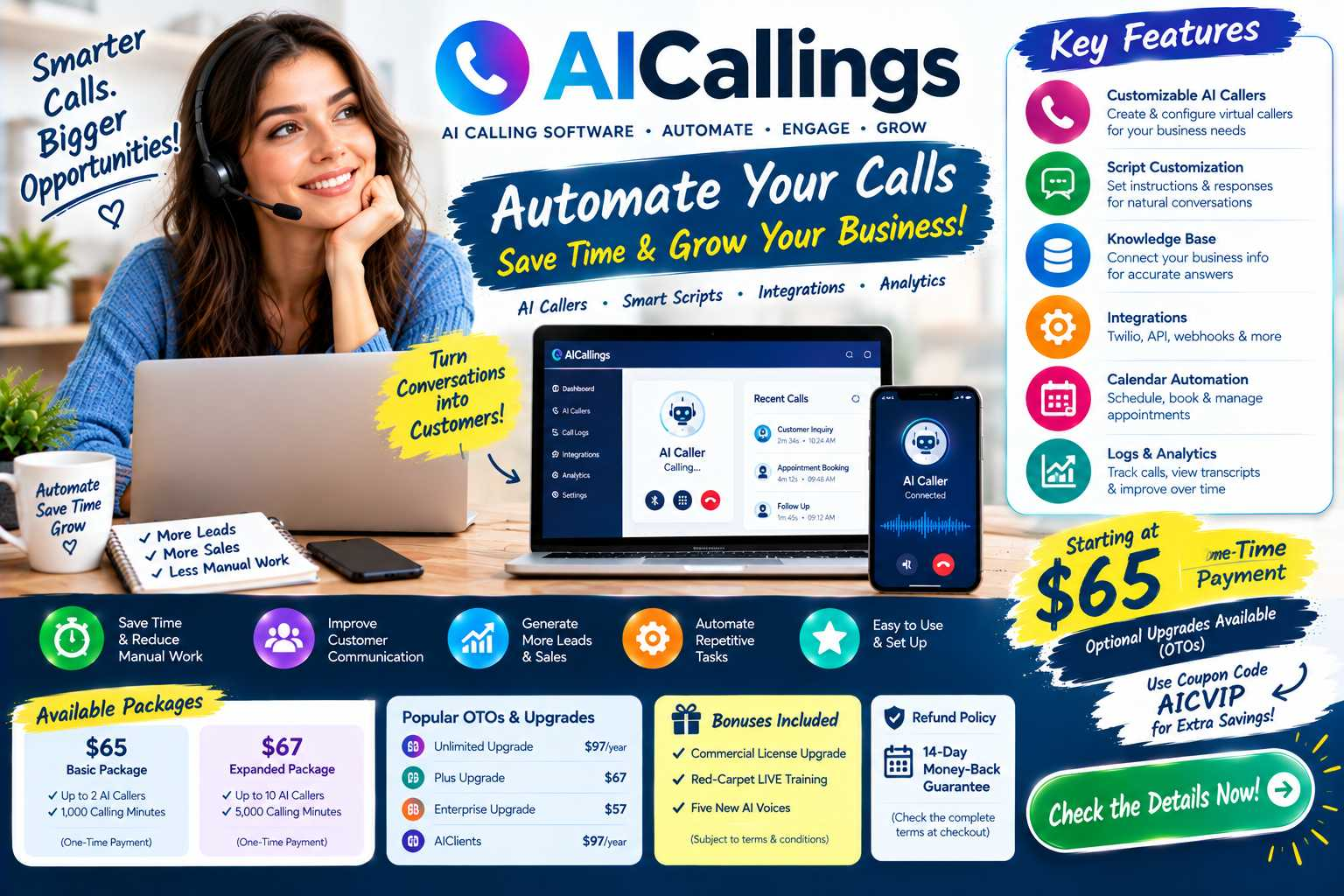
The advertised front-end options start at $65, with an expanded option at $67. Optional upgrades may increase the total considerably.
Front-End Pricing
Basic package — $65 one-time: Advertised as including two AI callers and 1,000 calling minutes.
Expanded package — $67 one-time: Advertised as supporting up to 10 AI callers and 5,000 calling minutes.
The expanded option lists a higher caller capacity and more minutes for a small increase in the stated upfront price. That may make it worth comparing closely, but verify the actual inclusions, restrictions, and checkout price before deciding.
AICallings OTOs and Optional Upgrades
An OTO, or one-time offer, is an additional product or upgrade presented during the purchase process. The billing terms of each AICallings offer should be checked carefully.
AICallings Unlimited — $97/year: Advertised as removing limits on the number of AI callers. Confirm whether other usage limits still apply.
AICallings Plus — $67: Advertises additional agents, multilingual capabilities, two-way conversations, and security features. The billing interval has not been confirmed.
AICallings Enterprise — $57: Advertises agency-focused capabilities, including white-labeling and client account access. The billing interval has not been confirmed.
AIClients — $97/year: Advertises a database of prospective local business clients. Check the database's coverage, accuracy, and permitted uses before relying on it.
The supplied information does not establish that every upgrade is necessary or suitable for every buyer. Confirm which offers appear at checkout and whether they are optional.
What Could AICallings Cost in the First Year?
Using the advertised expanded front-end price and assuming all four listed upgrades are purchased, the illustrative calculation is:
Expanded front-end option: $67
Unlimited: $97
Plus: $67
Enterprise: $57
AIClients: $97
Illustrative total: $385
This is a calculation based on the supplied advertised prices, not a verified checkout total. It assumes the upgrades are available at those prices and that the listed amounts represent the relevant purchase periods. It excludes taxes, telephony, AI usage, and other third-party costs. Only Unlimited and AIClients are explicitly listed with annual pricing in the available information.
For many buyers, the sensible approach is to start with the package that meets their actual requirements instead of purchasing every upgrade immediately.
✅ Get the latest AICallings offer ✅
AICallings Bonus: What Is Advertised?
The offer describes several bonuses, but their exact availability and inclusion conditions should be confirmed before purchase.
Commercial License Upgrade: Advertised as a licensing-related bonus. Review the license to understand what commercial use it permits and whether any restrictions apply.
Red-Carpet LIVE Training: Advertised live training intended to provide additional guidance. Confirm access arrangements, dates, and availability.
Five New AI Voices: Advertised as an addition to the available AI voice options. Check which voices are included and whether they require a particular package.
No independently verified monetary values have been established for these bonuses. Do not assume all three are included with every package or that they eliminate the need for paid services.
AICallings Pros and Cons
Pros
Two advertised front-end options at $65 and $67.
Potential to automate selected repetitive calling tasks.
Advertised caller customization and script tools.
Described integration options and workflow automation features.
Call logging and analysis capabilities are advertised.
Optional upgrades allow buyers to consider additional functionality.
Cons
Independent performance testing has not been established.
The basic and expanded packages have advertised calling-minute limits.
Some integrations may require technical setup or separate services.
AI usage and telephony costs may increase the operating expense.
Billing terms for some upgrades remain unclear.
The refund policy requires verification.
No verified evidence establishes guaranteed leads, sales, or business growth.
✅ Explore AICallings before deciding ✅
Who Should Use AICallings and Who Should Avoid It?
AICallings may be worth evaluating for:
Small businesses handling repetitive customer calls.
Appointment-based businesses exploring automated booking workflows.
Marketers who need structured follow-up processes and have appropriate permission to contact prospects.
Agencies interested in the advertised white-label and client-account features.
Technically comfortable users willing to test scripts, integrations, and operating costs.
It may not be suitable for:
Buyers expecting a completely hands-off setup.
Businesses that need proven voice quality before making a purchase.
Users who cannot accommodate separate telephony or AI usage expenses.
Organizations that need guaranteed results or independently verified performance data.
Businesses unable to meet applicable consent, privacy, recording, and telemarketing requirements.
Before launching any automated calling campaign, confirm that your contact list, purpose, calling method, and disclosures comply with applicable rules.
Frequently Asked Questions About AICallings Reviews
1. Is AICallings worth it for small businesses?
It may be worth evaluating if your business has repetitive calls that can be automated safely and accurately. Its value depends on call quality, setup effort, integrations, usage limits, and total operating costs. Test the workflow before relying on it for important customer interactions.
2. How much does AICallings cost?
The advertised front-end options are $65 and $67 as one-time payments. Optional upgrades are listed separately, including two offers priced annually at $97 each. Verify current checkout pricing, renewal terms, taxes, and additional usage expenses.
3. What are the main AICallings OTO offers?
The supplied offer information lists Unlimited, Plus, Enterprise, and AIClients. Their advertised prices are $97 per year, $67, $57, and $97 per year, respectively. Confirm availability, billing periods, and exact features before purchasing.
4. Does AICallings include unlimited calling minutes?
The supplied package details advertise 1,000 minutes for Basic and 5,000 minutes for Expanded. The Unlimited upgrade is described as removing limits on the number of AI callers, which does not necessarily mean unlimited calling minutes. Check the current terms.
5. Does AICallings offer a refund guarantee?
A verified refund window and complete refund conditions were not provided in the available information. Read the current refund policy before paying, including the deadline, eligibility requirements, and any restrictions.
6. Can AICallings guarantee more leads or sales?
No such outcome should be assumed. Results depend on the target audience, scripts, call quality, implementation, consent, and follow-up process. AI calling software cannot guarantee leads, sales, income, or business growth.
7. Are AICallings bonuses included with every package?
The advertised bonuses include a Commercial License Upgrade, Red-Carpet LIVE Training, and Five New AI Voices. Their availability and package requirements should be confirmed at checkout. Do not assume every bonus is included in every offer.
Final Verdict: Is AICallings Worth Considering?
These AICallings reviews point to a platform that may interest businesses looking to explore AI voice calling automation, customizable callers, and connected business workflows. Its advertised $65 and $67 entry options provide a relatively clear starting point, while the optional upgrades introduce additional capabilities and potential costs.
The biggest question is not simply whether the platform offers AI callers. It is whether those callers can handle your actual conversations accurately, integrate with your existing systems, and deliver enough practical value to justify the full cost.
Before buying, confirm the package details, minute limits, refund conditions, upgrade billing terms, and third-party expenses. Test the system with realistic scenarios and monitor call quality before using it for important customer interactions.
My recommendation: Treat AICallings as a tool to evaluate rather than a guaranteed business solution. It may suit users with a clear automation need who are comfortable testing and configuring their workflows. Buyers who require independently proven performance, predictable all-inclusive costs, or a verified refund policy should resolve those questions before committing.
A careful review of the complete offer and a realistic cost calculation will help you decide whether AICallings fits your business needs.
✅ Learn more about AICallings today ✅